1d) neuPrint Tutorial - How to Visualize and Plot Data
What Will You Learn in This Tutorial?
In this tutorial, you will learn how to visualize data, identify patterns, and begin interpreting what those patterns might mean biologically.
We will continue investigating the inputs to Kenyon cells (KCs) and ask questions such as:
Which cell types provide the strongest input to KCs? Do different KC types receive similar or different patterns of input?
Along the way, you will learn how to:
choose a visualization based on the biological question you want to answer;
use box plots to compare connection strengths across a cell type;
compare connectivity patterns across multiple KC types;
use hierarchical clustering to discover groups with similar connectivity profiles;
think about the difference between raw and normalized connection strength; and
investigate the biological identities and known functions of neurons using the scientific literature.
Although we use the mushroom body and Kenyon cells as our example throughout Tutorials 1b–1d, the approaches you are learning are transferable to many other neurons and brain regions in the connectome. The key is to understand enough about the biology of the neurons and circuits you are studying to decide which questions to ask, which analyses are appropriate, and how to interpret what you find.
# Load packages, then read the tables saved in Tutorials 1b and 1c.
from pathlib import Path

import pandas as pd
import plotly.express as px

data_dir = Path("data")
input_conn_df_v2 = pd.read_csv(data_dir / "input_to_KC_v2.csv")
input_conn_df = pd.read_csv(data_dir / "input_to_KC.csv")
Let’s do some plotting!
Now that we have processed our data, let’s visualize the different input partners of our KCs.
Our goal is to answer:
For a given KC type, what pre-synaptic cell types provide input to it, and how strongly do they connect?
Before we open Plotly, let’s stop and think about what kind of plot could help us answer this question.
Take out a pencil and paper
Imagine that you were doing this analysis without a computer.
You have a list of different neuron types that provide input to a particular KC, along with the number of synapses they make onto that KC.
Take out a pencil and paper and sketch a way you might visualize this.
Think about something you have probably seen in school:
We have different categories: the different input neuron types.
We have a number associated with each category: the connection strength.
We want to be able to compare the categories.
We also want to order them from strongest to weakest.
What kind of plot might be useful for this?
Don’t worry about getting the “right” answer immediately. There are often several ways to visualize the same data. The important thing is to think about what biological insight you want before deciding which plotting function to use.
Now think about the axes
If you were to make a plot, what would you put on each axis?
We have two pieces of information:
1. Input neuron type
This is a categorical variable. For example:
PN1, PN2, PN3, PN4
2. Connection strength
This is a numerical variable. For example:
120, 85, 42, 15
So we need a visualization that allows us to compare a number across different categories.
Once you have an idea, try sketching it.
Then ask yourself:
How would I order the plot so that the strongest input partner appears first?
This is an important part of the visualization. We are not just interested in which neurons provide input, we also want to see which ones provide the strongest input.
Your turn! Before looking at the Plotly code, try to answer:
What type of plot would you use?
What would go on the x-axis?
What would go on the y-axis?
How would you order the input neuron types?
Once you have your idea, feel free to use your idea or you can follow mine below.
input_conn_df_v2['instance_post'].unique() #types of KCs

#Note: use instance because a cell type can be present in both hemispheres are the brain. So it's good to treat them separately when calculating things.
<ArrowStringArray>
['KCa'b'-ap2_R', 'KCg-m_R', 'KCa'b'-ap1_R', 'KCab-s_R',
'KCab-c_R', 'KCab-m_R', 'KC_R', 'KCa'b'-ap2_L',
'KCg-m_L', 'KCab-s_L', 'KCa'b'-ap1_L', 'KCa'b'-m_L',
'KCab-m_L', 'KCab-c_L', 'KCab-p_L', 'KCg-d_R',
'KCa'b'-m_R', 'KCg-s4_R', 'KCg-s1_L', 'KCg-d_L',
'KCg-s2_R', 'KCg-s3_L', 'KCg-s4_L', 'KCab-p_R',
'KCg-s1_R', 'KCg-s3_R', 'KCg-s2_L', 'KCg_L']
Length: 28, dtype: strdf_plot = input_conn_df_v2[input_conn_df_v2['instance_post'] == "KCa'b'-ap1_R"] #subset for a KC of interest to plot# Calculate median "summed weight" with which a pre cell type connects to "KCa'b'-ap1"
df_plot['med_type_pre_sum_weight'] = df_plot.groupby('instance_pre')['sum_weight'].transform('median')# What are (on median) the strongest input cell type partners for this KC?
df_plot.sort_values('sum_weight', ascending=False)# Extract the order of the Input cell types by the median input strength they send to "KCa'b'-ap1"
order_partners = df_plot.groupby('instance_pre')['med_type_pre_sum_weight'].first().sort_values(ascending=False).index.tolist()
order_partners['DC4_adPN_R',
'APL_R',
'VM1_lPN_R',
'DA1_lPN_R',
'VA6_adPN_R',
'VC1_lPN_R',
'D_adPN_R',
'VA3_adPN_R',
'VM6_adPN_R',
'V_ilPN_L',
'M_adPNm8_R',
'DC3_adPN_R',
'DM4_adPN_R',
'DC1_adPN_R',
'VA5_lPN_R',
'VP1d_il2PN_R',
'VP3+VP1l_ivPN_R',
'VL2a_adPN_R',
'VP1d+VP4_l2PN1_R',
'DL2d_adPN_R',
'DC2_adPN_R',
'VA1d_adPN_R',
'DL1_adPN_R',
'DA4l_adPN_R',
'DP1m_adPN_R',
'VP3+VP1l_ivPN_L',
'DP1l_adPN_R',
'VL2p_adPN_R',
'VP1d_il2PN_L',
'VP1m+VP5_ilPN_L',
'V_ilPN_R',
'DL5_adPN_R',
'VM5d_adPN_R',
'VA7m_lPN_R',
'VA2_adPN_R',
'VP1m+VP5_ilPN_R',
'VC5_lvPN_R',
'VA7l_adPN_R',
'VM5v_adPN_R',
'VC3_adPN_R',
'VM4_adPN_R',
'M_lPNm11D_R',
'VM7d_adPN_R',
'DA2_lPN_R',
'VP1m_l2PN_R',
'LHPV3c1_R',
'VL1_ilPN_R',
'VP3+_vPN_R',
'VC2_lPN_R',
'VC4_adPN_R',
'VP1m+VP2_lvPN2_R',
'VA4_lPN_R',
'DPM_R',
"KCa'b'-ap2_R",
"KCa'b'-ap1_R",
'VP5+Z_adPN_R',
"PPL104(a'3)_R",
'KCg-m_R',
'MB-C1_R',
"PPL104(a'3)_L",
"PAM02(B'2a)_R",
"PAM05(B'2p)_R",
"PPL103(y2a'1)_R",
"PPL103(y2a'1)_L",
'VP2+_adPN_R',
'APL_L',
"PAM13(B'1ap)_R",
"PAM13(B'1ap)_L",
"PAM05(B'2p)_L",
"PAM02(B'2a)_L",
"KCa'b'-m_R",
'DN1a_R',
'PPL202_R']fig_KC_input = px.box(df_plot, x="instance_pre", y="sum_weight", category_orders={"instance_pre": order_partners})
fig_KC_input.update_layout(
width=1200,
height=700,
template="plotly_white",
xaxis_title="Input cell types to KCa'b'-ap1",
yaxis_title="Number of synapses",
font=dict(family="Arial", size=14)
)
fig_KC_input.show()To me, a simple box plot is a good way to visualize this.
On the x-axis, we can have the input partner cell types, and on the y-axis, we can have the number of synapses.
Each plot will be dedicated to one KC cell type.
But why use a box plot rather than simply plotting one value for each input cell type?
Remember that so far, we have only removed duplicate neuron–neuron connections. We have not removed duplicate cell-type–cell-type connections.
For example, imagine that several PN neurons all provide input to the same KC type:
| Input neuron | KC neuron | Synapses |
|---|---|---|
| PN neuron 1 | KC neuron 1 | 20 |
| PN neuron 2 | KC neuron 1 | 35 |
| PN neuron 3 | KC neuron 2 | 12 |
| PN neuron 4 | KC neuron 2 | 28 |
These are all connections between the same cell types, but they are different connections between individual neurons.
This gives us a population of neuron-level connections for each cell-type pair.
A box plot allows us to see the distribution of connection strengths within that population.
For each input cell type, we can therefore ask:
How strongly do individual neurons of this cell type tend to connect to neurons of this KC type?
The box plot can show us the median, spread, and range of these connection strengths rather than reducing everything to a single number.
We can then order the input cell types on the x-axis according to their typical connection strength, for example by their median.
This gives us a visualization where the strongest input cell types appear first, making it easier to compare the different partners.
So our visualization is answering:
For this KC type, which pre-synaptic cell types provide input, and how strong are those connections across individual neurons?
This is also a good example of why it is important to understand exactly what we have processed. We have collapsed connections across ROIs for individual neuron pairs, but we have deliberately kept the different neuron-to-neuron connections within each cell-type pair. That remaining variation is exactly what the box plot allows us to visualize.
Some advice on getting started with Plotly
Plotly Express and Plotly Graph Objects (go) are great visualization tools for exploring your data. One particularly useful feature is that Plotly creates interactive plots, which is especially handy when you are working with lots of cell types. You can zoom in, hover over points, and explore your data directly in the figure.
To get started, let’s say we want to make a box plot like the one above. A good first step is simply to search the Plotly documentation for the type of plot you want.
As you scroll through the documentation, you will find examples showing different ways to create and customize box plots. Try to understand what each part of the example is doing, and then adapt it to your own data.
For example, you might start with a basic box plot and then experiment with changing the axis labels, figure size, ordering, or other properties.
For more advanced customization, you can use Plotly Graph Objects (go). This gives you much finer control over individual parts of your visualization and opens up many more visualization techniques. We will cover this in a separate tutorial, but you can already explore the examples in the Plotly documentation if you are curious.
You may also have noticed that we used a categorical axis to order our cell types from the strongest input to the weakest.
A categorical axis is an axis containing discrete categories, such as cell types, rather than continuous numerical values. Plotly provides documentation on how to control the ordering and formatting of categorical axes.
How to make sense of what you see
We can see that the top five input cell types to KCa’b’-ap1 (once we zoom into the plot), ranked by number of synapses, are: ‘DC4_adPN’, ‘APL’, ‘VM1_lPN’, ‘DA1_lPN’, ‘VA6_adPN’
But what are these cell types? What do they do? And why might they be providing such strong input to this KC?
This is where we move from data analysis to biological interpretation.
A great resource for exploring Drosophila cell types is Virtual Fly Brain (VFB). VFB brings together cell-type annotations, anatomy, synonyms used in the literature, and references associated with those annotations. Virtual Fly Brain
Here is a tutorial on getting started with the VFB search. When searching, select Adult and use Type as your search criterion:
Virtual Fly Brain: Search tutorial
What should you look for?
Look for:
What does the acronym stand for?
What synonyms have been used for this cell type?
Particularly useful when searching the literature. A cell type may have been called something different in an older paper than the name used in our connectome dataset.
What does the literature say about its function?
Which papers are associated with the cell type?
Virtual Fly Brain: Understanding cell-type annotations
Your task
“What might the identity and known function of these input neurons tell us about the information being delivered to this KC?”
This is where connectomics becomes particularly interesting: the plot gives us an observation, and the literature helps us develop hypotheses about what that observation might mean.
Other ways of visualizing to gain insight
Do different KC cell types receive inputs from similar cell types and strengths?
Remember that so far we have looked at one KC type, KCa’b’-ap1, at a time. A heatmap gives us a way to compare the input patterns of many KC types simultaneously.
A heatmap is essentially a grid where the rows and columns represent categories, and the value in each square is represented by its color.
For our question, we could have:
Rows: KC cell types
Columns: input cell types
Color: connection strength (med_type_pre_sum_weigh)
First, we need to change the shape of our data:
Our dataframe is currently in long format. That means we have many rows, with each row representing a connection:
instace_pre       instance_post        med_type_pre_sum_weigh
APL_R            KCa'b'-ap1_R      120
VC1_lPN_R        KCa'b'-ap1_R       85
VA6_adPN_R      KCa'b'-ap1_R       72
APL_R            KCa'b'-ap2_R       95
VC1_lPN_R        KCa'b'-ap2_R       20
...
This is useful for many analyses, but a heatmap naturally works with a grid.
We therefore want to reshape our dataframe into wide format:
             APL_R   VC1_lPN_R   VA6_adPN_R   VA3_adPN_R
KCa'b'-ap1_R   120      85         72         64
KCa'b'-ap2_R    95      20         61         10
KCγ_R           12      78         15         70
Here, each row is a KC type, each column is an input cell type, and each value represents the strength of that connection.
How do we make this?
We want:
instance_post→ rows
instance_pre→ columns
sum_weight→ values
What pandas function might allow us to rearrange our dataframe this way? If you are not sure, this is another good opportunity to search the pandas documentation or ask an AI model. Once you have figured that out, we can use the resulting dataframe as the input to our heatmap.
For example, pandas’ pivot() function can perform this reshaping.
But first, let’s prepare our data
Remember that we need to go back to our original input_conn_df_v2, which contains all of our KC types. We previously used a subset of this dataframe to investigate a single KC type, but now we want to compare all of them.
First, we calculate the median connection strength for each cell-type pair.
There can be many neuron-to-neuron connections between the same two cell types, so we group by instance_post and instance_pre and calculate the median sum_weight. This gives every neuron-to-neuron connection belonging to the same cell-type pair the same median value.
input_conn_df_v2['med_type_pre_sum_weight'] = input_conn_df_v2.groupby(['instance_post','instance_pre'])['sum_weight'].transform('median')We only need one value for each cell-type pair for our heatmap, so we can now remove the duplicate cell-type pairs.
Notice that we are removing duplicates based on cell type, rather than bodyId_pre and bodyId_post.
Earlier, we removed neuron–neuron duplicates (after summing the number of synapses) because the same pair could appear across multiple ROIs. Here, we are doing something different: we have already calculated our median across the neuron-level connections, and now we only need one row representing each cell-type → cell-type relationship.
We can then also remove the columns that we no longer need for this visualization.
input_conn_df_total_syn = input_conn_df_v2.drop_duplicates(['instance_post', 'instance_pre']) # we only keep type to type connectivity (neuron-level is lost)
input_conn_df_total_syn= input_conn_df_total_syn.drop(columns=['bodyId_pre', 'bodyId_post', 'weight', 'sum_weight'])
input_conn_df_total_synNow let’s make our dataframe wide
We can use pivot():
Think back to our three questions:
What goes on the rows? →
instance_post
What goes on the columns? →
instance_pre
What goes inside each cell? →
med_type_pre_sum_weight
Finally, some KC–input cell-type combinations may not exist in our dataset. These appear as NaN after pivoting.
For this visualization, we want a missing connection to be represented as zero, so we can replace the NaN values:
Now heatmap_df has the structure we need to make our heatmap.
# heatmap
heatmap_df_total_syn = input_conn_df_total_syn.pivot(index="instance_post", columns="instance_pre", values="med_type_pre_sum_weight")
heatmap_df_total_syn = heatmap_df_total_syn.fillna(0) #fill all cells with no conenctions with nan to 0
The important thing to notice is that we have transformed our data several times because the structure we need depends on the question we are asking.
This is a common pattern in data analysis: the same biological data can be represented in different ways to answer different questions.
Now let’s finally make a heatmap using plotly!
fig_heatmap_input = px.imshow(
    heatmap_df_total_syn,
    labels={
        "x": "Input cell type",
        "y": "KC cell type",
        "color": "Number of synapses"
    },
    color_continuous_scale=[[0, "white"],[1, "blue"]],
    aspect="auto"
)
fig_heatmap_input.update_layout(
    width=1200,
    height=700,
    template="simple_white",
    font=dict(family="Arial", size=14)
)
fig_heatmap_input.show()Clustering can help us find patterns
You may notice that there are some similarities in the heatmap, but they can be difficult to spot when we have many KC and input cell types.
This is where clustering can be helpful.
Instead of looking at every row and column individually, we can ask:
Which input cell types tend to connect to similar groups of KCs?
Clustering groups rows or columns that have similar patterns in the data. In our case, this means that KC types with similar input profiles can be placed close together, while KC types with very different input profiles are placed farther apart.
For example, imagine two KC types:
          APL   PN1   PN2   PN3
KC1        20    15     2     1
KC2        18    17     3     2
KC3         1     2    20    15
KC1 and KC2 have very similar input patterns, while KC3 receives a very different combination of inputs.
A clustering algorithm could therefore place:
KC1
KC2
       together

KC3
       separately
This can reveal structure that is difficult to see by simply looking at the heatmap.
How does the clustering actually work?
There are many different ways to cluster data. Here, we will use hierarchical clustering based on correlation.
The basic idea is simple:
If two KCs have similar patterns of inputs, they should be considered similar.
We can use correlation to measure how similar their input patterns are.
For example:
KC1 = [20, 15, 2, 1]
KC2 = [18, 14, 3, 2]
These two KCs have a very similar pattern: they receive relatively strong input from APL and PN1, and relatively weak input from PN2 and PN3.
Their correlation would therefore be high.
In contrast:
KC3 = [1, 2, 20, 15]has almost the opposite pattern, so its correlation with KC1 and KC2 would be much lower.
We can convert correlation into a distance:
High correlation → small distance → more similar
Low correlation → large distance → less similar
One common way to do this is:
distance = 1 - correlationSo a correlation of 1 gives a distance of 0, meaning the two profiles are identical in their pattern.
Why is it called hierarchical clustering?
We start by treating every KC as its own group:
KC1 KC2 KC3 KC4 KC5We then find the most similar KCs and join them together.
For example:
KC1 ──┐
      ├── Group 1
KC2 ──┘

KC3 ──┐
      ├── Group 2
KC4 ──┘

KC5
We then continue combining the groups based on their similarity until eventually all KCs belong to one large hierarchy.
This produces a dendrogram:
             ┌── KC1
         ┌───┤
         │   └── KC2
     ┌───┤
     │   └──── KC5
─────┤
     │   ┌──── KC3
     └───┤
         └──── KC4
The dendrogram gives us a visual representation of the relationships between the KC input profiles.
We can then reorder our heatmap according to this hierarchy so that KCs with similar input patterns appear next to one another.
One important caveat: the resulting clusters are mathematical groupings, not automatically biological categories. A cluster tells us that cell types have similar connectivity patterns according to the metric and clustering method we chose. It is then up to us to investigate whether those patterns have a meaningful biological explanation.
Here is a great video on hierarchical clustering: https://
from scipy.spatial.distance import pdist # install scipy into your environment if you do not have it.
from scipy.cluster.hierarchy import linkage, leaves_list

# Calculate correlation-based distances between KC input profiles
distance_rows = pdist(heatmap_df_total_syn.values, metric="correlation")

# Perform hierarchical clustering
linkage_matrix_rows = linkage(distance_rows, method="average") # KC

# Get the order of KC types from the clustering
order_rows = leaves_list(linkage_matrix_rows) # KC

# Reorder the heatmap (rows)
heatmap_clustered_total_syn = heatmap_df_total_syn.iloc[order_rows]
fig_heatmap_input_clust = px.imshow(
heatmap_clustered_total_syn,
labels={
"x": "Input cell type",
"y": "KC cell type",
"color": "Number of synapses"
},
color_continuous_scale=[[0, "white"],[1, "blue"]],
aspect="auto"
)
fig_heatmap_input_clust.update_layout(
width=1200,
height=700,
template="simple_white",
font=dict(family="Arial", size=14)
)
fig_heatmap_input_clust.show()Normalization
So far, we have been using the raw number of synapses as our measure of connection strength.
But let’s think about what that means biologically.
Imagine two KC types:
| KC | Total incoming synapses | Synapses from Partner 1 |
|---|---|---|
| KC-1 | 1,000 | 20 |
| KC-2 | 100 | 20 |
Both KCs receive 20 synapses from Partner 1. If we only look at the raw number of synapses, we would say that Partner 1 has the same connection strength to both KCs.
However, these KCs receive very different amounts of total input from the partners they connect to. KC-1 receives 1,000 incoming synapses, whereas KC-2 receives only 100.
So is a connection of 20 synapses really equivalent for both KCs?
For KC-1:
Only 2% of its incoming synapses come from Partner 1.
For KC-2:
Now 20% of its incoming synapses come from Partner 1.
So although the two connections have the same raw strength, Partner 1 accounts for a much larger proportion of KC-2’s input.
This is where normalization becomes useful.
Instead of asking:
How many synapses does Partner 1 make onto this KC?
we can ask:
What proportion of this KC’s total input comes from Partner 1?
We can calculate this as:
For our example:
KC-1: 20 / 1000 = 0.02 → 2%

KC-2: 20 / 100  = 0.20 → 20%
Now we can see something that was hidden when we only looked at raw synapse counts: Partner 1 contributes much more strongly, proportionally, to KC-2 than to KC-1.
This is an important consideration when analyzing connectomic data. There is no single “correct” measure of connection strength—the best measure depends on the biological question we are asking.
Raw synapse counts tell us about absolute connectivity, whereas normalized values can tell us about the relative contribution of a partner to a cell type’s overall input.
Let’s try plotting a heat map with normalized input connection strengths:
# Let's use input_conn_df_v2 again. Recall that we previously summed all synapses between each bodyId_pre and bodyId_post pair
# because a single neuron-to-neuron connection can be distributed across different brain regions.

# NEW: We now normalize each connection by the total number of input synapses received by that postsynaptic neuron.
# This tells us what fraction of a neuron's total input comes from each presynaptic partner.

# For each postsynaptic neuron (bodyId_post), calculate its total number of input synapses across all presynaptic partners.
input_conn_df_v2['total_input_to_postId'] = input_conn_df_v2.groupby('bodyId_post')['sum_weight'].transform('sum')

# Normalize each connection by the total input to that postsynaptic neuron.
# This gives the fraction of the neuron's total input contributed by that presynaptic partner.
input_conn_df_v2['norm_input_to_postId'] = input_conn_df_v2['sum_weight'] /input_conn_df_v2['total_input_to_postId']

# We now summarize these neuron-level normalized values at the cell-type level.
# For each presynaptic cell type, calculate the median normalized input across the individual postsynaptic neurons represented in the dataset.
input_conn_df_v2['med_norm_input_to_posttype'] = input_conn_df_v2.groupby('instance_pre')['norm_input_to_postId'].transform('median')

# Keep one row for each cell-type-to-cell-type connection. At this point, we no longer need the individual neuron IDs.
input_conn_df_input_norm = input_conn_df_v2.drop_duplicates(subset=['instance_post', 'instance_pre'])
input_conn_df_input_norm = input_conn_df_input_norm.drop(columns=['bodyId_pre', 'bodyId_post', 'weight'])

# Convert the table into a matrix where:
#   - rows = postsynaptic cell types
#   - columns = presynaptic cell types
#   - values = median normalized input
heatmap_df_input_norm = input_conn_df_input_norm.pivot(index="instance_post", columns="instance_pre", values="med_norm_input_to_posttype")

# Cell-type pairs with no detected connection are represented as NaN.
# Replace these with 0 so that the matrix can be used directly for plotting.
heatmap_df_input_norm = heatmap_df_input_norm.fillna(0)
# Clustering
# Calculate correlation-based distances between KC input profiles
distance_rows_norm = pdist(heatmap_df_input_norm.values, metric="correlation")
# Perform hierarchical clustering
linkage_matrix_rows_norm = linkage(distance_rows_norm, method="average") # KC
# Get the order of KC types from the clustering
order_rows_norm = leaves_list(linkage_matrix_rows_norm) # KC
# Reorder the heatmap (rows)
heatmap_clustered_input_norm = heatmap_df_input_norm.iloc[order_rows_norm]fig_heatmap_input_norm_clust = px.imshow(
heatmap_clustered_input_norm,
labels={
"x": "Input cell type",
"y": "KC cell type",
"color": "Normalised Input Synapses"
},
color_continuous_scale=[[0, "white"],[1, "blue"]],
aspect="auto"
)
fig_heatmap_input_norm_clust.update_layout(
width=1500,
height=1000,
template="simple_white",
font=dict(family="Arial", size=14)
)
fig_heatmap_input_norm_clust.show()How to interpret clustering?
Since we clustered the Kenyon cells (KCs) based on their receiving profiles, the rows (y-axis) are grouped according to how similar their inputs are. KCs with similar input profiles will therefore appear closer together in the clustering, while the color indicates the strength of their inputs according to the color legend.
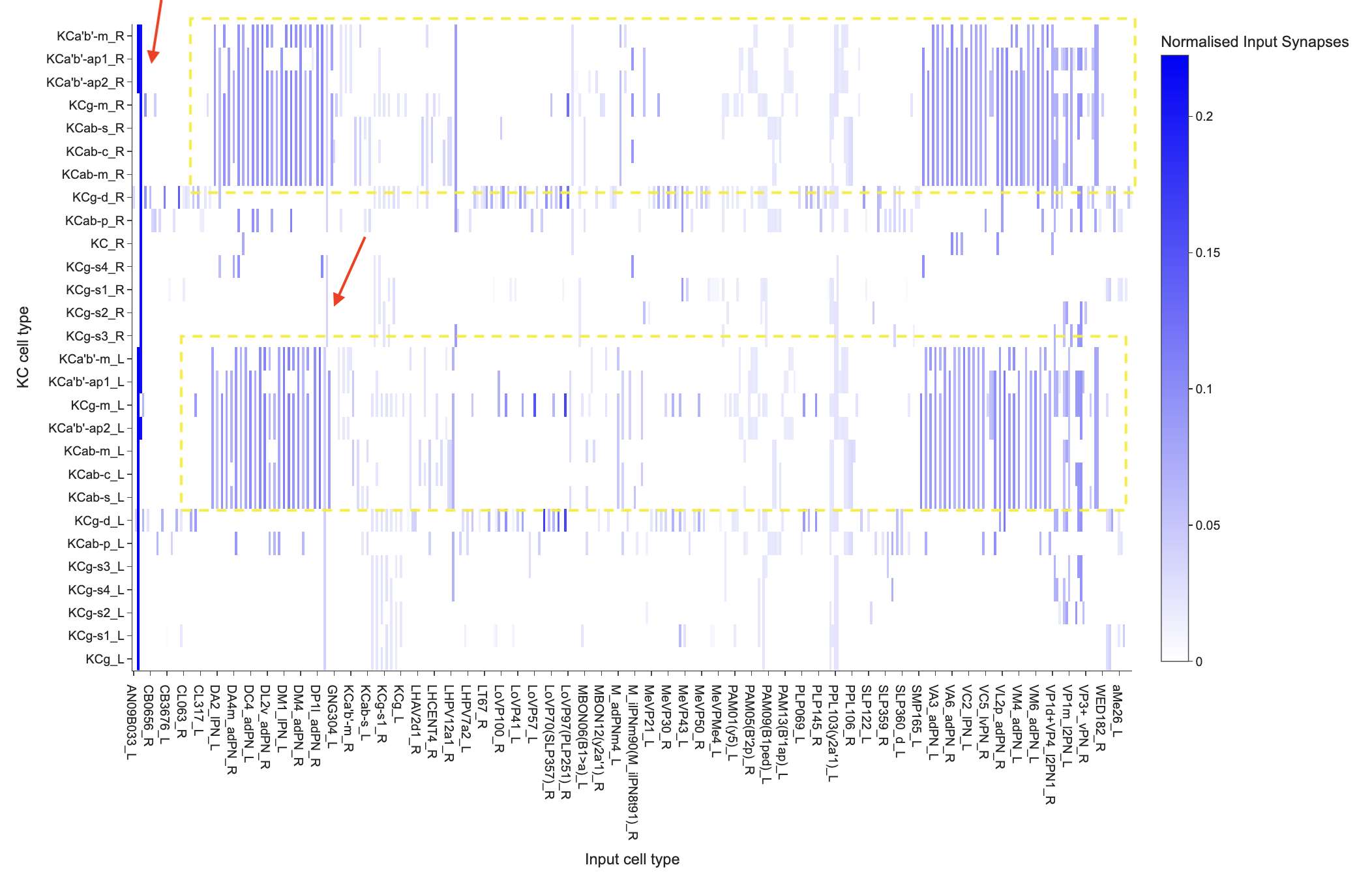
Highlight of Clustered KC’s (right and left KCs shown together) and APL and DPM Input Cell Types (in red arrows). Zoom on the interactive heatmap to extend the x-axis to find these cell types.
For example, we can see that APL and DPM provide input across all KC types, although KC_R appears to be an exception. In contrast, some KC types—such as KCg-m, KCa’b’-ap2, KCa’b’-ap1, KCab-s, KCab-c, KCa’b’-m, and KCab-m—appear to have more similar input profiles, with substantial input from projection neurons (PNs).
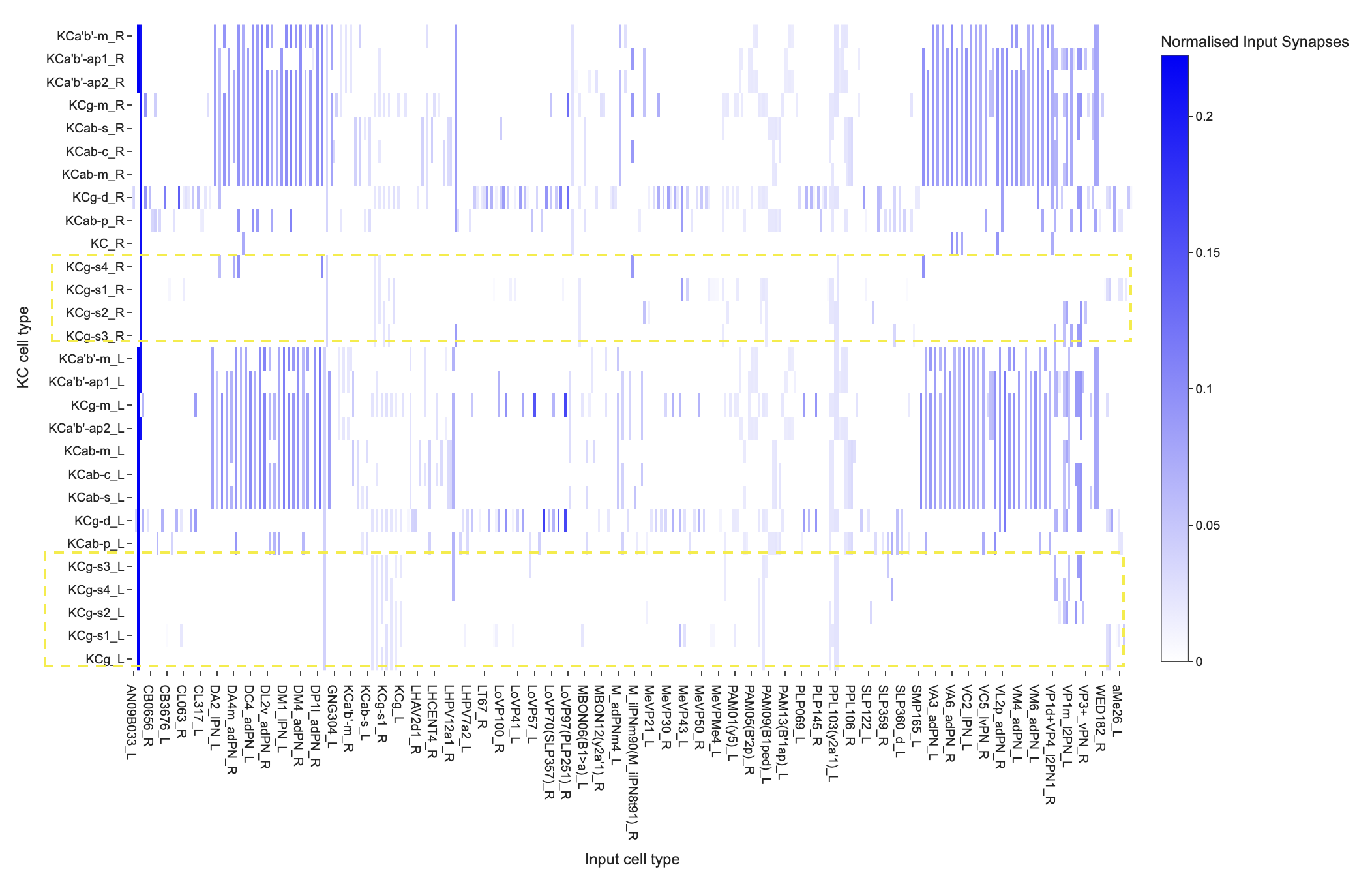
Highlight of Clustered KC’s (right and left KCs shown together)
Another group, including KCg-s2, KCg-s1, KCg, KCg-s3, and KCg-s4, appears to form a separate cluster for the left soma cell types (cell bodies on the left hemisphere of the fly brain). For the right soma cell types, its less clear. These KCs show input from other KCs as well as from PPL dopaminergic neurons, suggesting that their input profiles differ from those of the PN-dominated group.
Importantly, clustering tells us which KCs have similar connectivity patterns, but it does not by itself tell us why they are similar. We can therefore use the literature to ask whether these connectivity patterns correspond to known functional differences between KC types.
Explore these groups
Choose one of the KC groups identified above and investigate:
What are the known roles of these KC types?
Can you find evidence in the literature that might help explain why these KCs receive similar or different inputs?
For example, APL is a GABAergic, inhibitory neuron that spans much of the mushroom body, including the calyx where projection neurons provide input to Kenyon cells. This widespread connectivity is consistent with APL providing feedback inhibition across the mushroom body. See the third paragraph on page 469 of Modi et al., 2020 for a discussion of APL.
DPM is a serotonergic dorsal paired medial neuron that also spans the entire mushroom body which are required for stable odour memory see abstracts of (Keene et al., 2006) and [(Keene et al., 2004)](https://
KCg-m, KCa’b’-ap2, KCa’b’-ap1, KCab-s, KCab-c, KCa’b’-m, and KCab-m Cluster:
See Lin 2023 and go to the section Adult fly mushroom body. I have copied the paragraph from the review article you need to see here and also examine Figure 1C and D with the text:
“The main framework of the adult MB comprises ∼2000 intrinsic neurons called Kenyon cells (KCs) (Aso et al., 2014; Li et al., 2020)... The KC cell bodies are clustered in posterior regions of the brain, and their neurites are bundled together and extend anteriorly to form a stalk-like structure called the peduncle. At the end of the peduncle, the neurites separate to form three medial-projecting lobes (γ, β, and β′) and two vertical-projecting lobes (α and α′) (Figure 1A). The KC neurites constituting these MB lobes are considered axons, although they harbor both pre- and post-synaptic sites. The KCs are unipolar, and their dendrites branch out near the cell bodies to form a calyx structure. The axons comprising the α and β lobes emanate from the same αβ KCs, whose neurites branch into one dorsal- and one medial-projecting process upon exiting the peduncle. Similarly, for the axons forming the α′ and β′ lobes, they are branches of the same α′β′ KCs. However, axons from the γ KCs do not have a dorsal branch and extend only medially to establish the γ lobe. These three main KC classes have been further subdivided into subtypes based on their morphologies and molecular markers (Tanaka et al., 2008; Aso et al., 2014; Li et al., 2020). For example, the γ KCs have dorsal (d) and main (m) subtypes, whose axons occupy distinct portions of the γ lobe; the α′β′ KCs have anterior-posterior 1 (ap1), ap2, and middle (m) subtypes, whereas the αβ KCs have posterior (p), surface (s), middle (m), and core (c) subtypes. See Aso et al., and Li et al., for the single-cell morphologies of these KC subtypes and lobe layers occupied by their axons (Aso et al., 2014; Li et al., 2020).”
Also see this image below from Aso et al., 2014. Also refer to Figure 3, for an understanding how KCs are named based on the MB lobes they innervate.
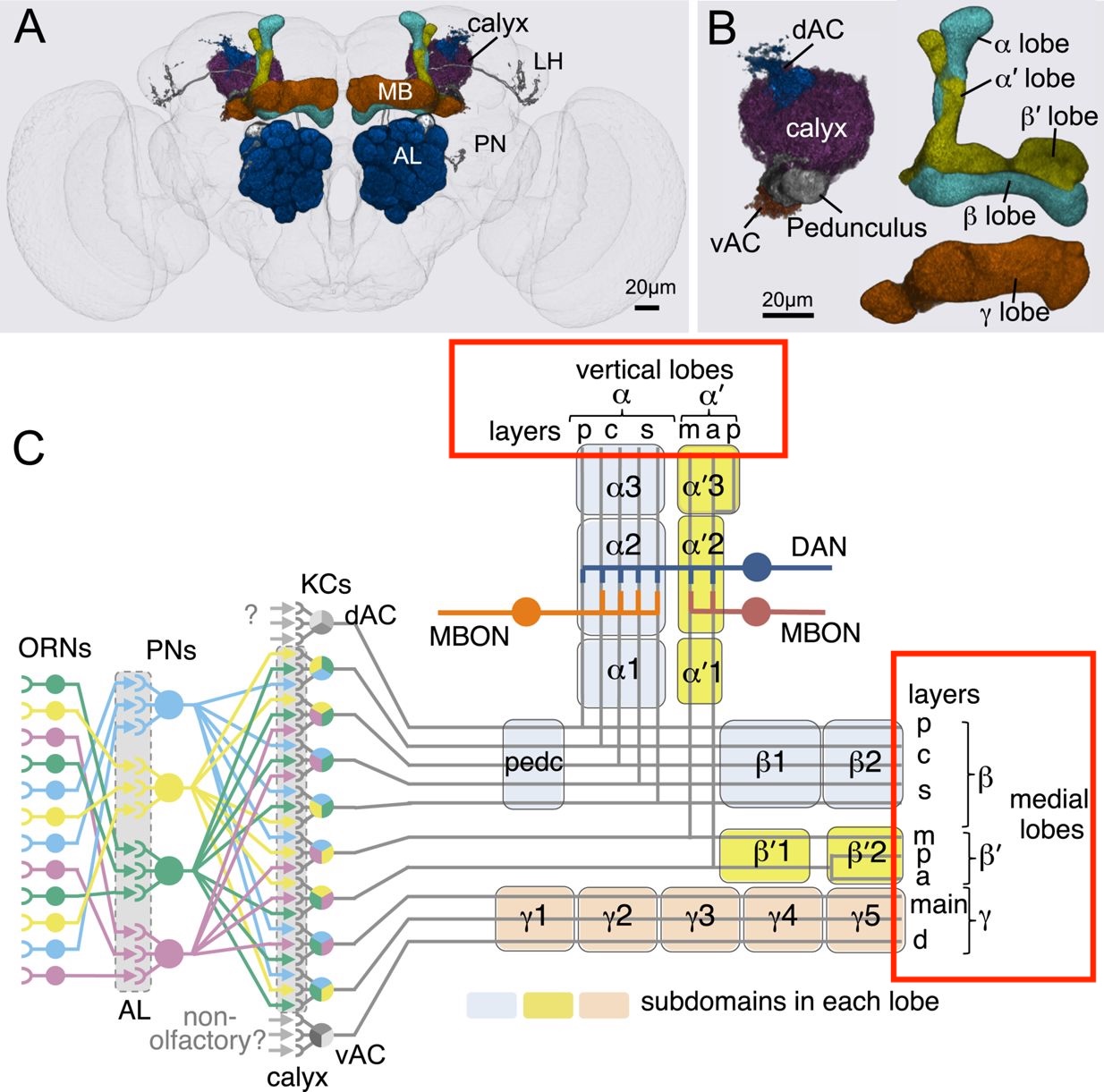
Mushroom Body (MB) Anatomy. Red Boxes highlight the layers of MB lobes
The anatomical organization described in the literature provides an interesting context for our clustering result. Several of the KC subtypes that cluster together belong to the same major KC classes and occupy related regions of the mushroom body. This suggests that anatomical and molecular differences between KC subtypes may be reflected in their patterns of connectivity. However, there are also some interesting exceptions. For example, KCab-p does not fall within this cluster, suggesting that it receives a different pattern of inputs from the other αβ KC types. Why might this be the case? Can you find evidence in the literature that could explain this difference? You may also notice that KC_R appears as a cell type in our heat map but is not clearly described as a specific KC subtype in the literature we consulted. This is worth noting and investigating further.
Investigating the projection neurons
The KC types in this cluster appear to receive substantial input from two groups of projection neurons, including neurons whose names begin with D and V PNs. We can now use the Connectome Interpreter Cell Type Function List to investigate what is known about these cell types.
Search for the cell types of interest in the cell_type column, then examine the available information about their known functions and the associated literature in the corresponding columns.
For the group on the left, I would summarize it as a very heterogeneous set of olfactory channels carrying information about both positive and negative ecological signals. You have food-related channels such as DC3, DM1-6; but also quite danger channels such as DA2 (geosmin), DA4l (indole), DC4 (acid/high CO₂), DL4 (parasitoid-wasp pheromone), and DL5 (aversive odors). There are also explicit social/pheromonal channels such as DA1 and DL3. Whereas group 2 on the right, the cell types concern the kinds of odors associated with fruit, yeast, fermentation, decaying material, food, and reproduction. For example, VA2 is associated with fermentation/vinegar attraction, VA3/VA4 with yeast/fruity odors, VM1 with decaying fruit/food, VM3 with fermentation, VM4 with decaying fruit, and VM5d/v and VM7d/v with fruity/yeasty/fermentation cues. There are also some reproductive associated cell types: VA1v detects the fly odor methyl laurate and is associated with male copulation; VC2 is associated with suppression of oviposition; VC5 with decaying fruit and egg-laying; and VL2a with male courtship.
What do names like DA1 and VM2 mean?
Projection neurons are often named after the antennal-lobe glomerulus they receive information from. The letters describe approximately where that glomerulus sits in the antennal lobe: Dorsal, Ventral, Anterior, Posterior, Lateral, Medial, or Central. The number distinguishes nearby glomeruli. For example, a DA1 projection neuron receives information from the DA1 glomerulus, while a VM2 projection neuron receives information from VM2. See Laissue et al, 1999 to understand naming.
As an exercise:
Try to make sense of the second cluster: KCg-s2, KCg-s1, KCg, KCg-s3, and KCg-s4 (left soma cell types). Why do you think this reconnectivity motif among KC’s is observed?
The tutorial ends here for now!
At this point, you have explored several ways of asking questions about connectomic data—from identifying input partners, to comparing connection strengths, to clustering KC types based on their connectivity patterns, and understanding and interpreting data.
But the analysis does not have to end here.
Think about the biological question you are trying to answer. Different questions may require different ways of processing and visualizing the same data. Connectomics can be used to ask many different questions, and answering one question often leads to several more. There is not always one “right” way to analyze the data. What matters is that you:
Clearly define the biological question you are trying to answer.
Make sure your code does what you think it does.
Understand the assumptions behind your processing choices.
Think critically about the limitations of your analysis.
Consider whether your results actually support the biological conclusions you are drawing. As you explore the fly brain, try not to think of coding as simply a way to get an answer. Instead, think of it as a tool for turning biological questions into testable analyses. Have fun exploring the fly brain!
Where Do I Go From Here?
So far, we have focused mainly on which neurons provide input to Kenyon cells (KCs) and how those input patterns differ across KC types. But this is only one small part of the mushroom body (MB) circuit!
From here, the goal is to start thinking about what you find interesting. What did you notice in the data? What surprised you? What new biological questions did your results raise? Or, is there something else you want to explore.
Below are several possible directions to help you get started. You do not need to investigate all of the questions above. You might follow one of these directions, combine several of them, or discover a completely different question while exploring the connectome.
The analyses we have learned throughout these tutorials—fetching connections, grouping neurons by cell type, calculating connection strengths, normalizing data, creating heatmaps, clustering, and visualizing neurons—are tools. They can be adapted to many different biological questions.
And although we have used the mushroom body as our example, the same general approaches can be applied to other neurons, circuits, and brain regions in the connectome.
The important part is to learn about the biology of the system you are studying. Read the literature, examine the anatomy, explore the data, and let what you discover guide your next question.
Follow the Information Forward: Where Do KCs Send Their Outputs?
So far, we have mostly asked: Who sends information to KCs?
What happens if we reverse the question? Who receives information from KCs?
You could investigate:
What are the strongest output partners of different KC types?
Do all KC types connect to the same downstream cell types?
Are some KC → downstream connections much stronger than others?
How similar are the output connectivity profiles of different KC types?
What are the known biological functions of their major output partners?
This may lead you to a broader principle of MB organization: expansion and convergence. Look into this, does your data support this? Why might a learning circuit be organized this way?
From Projection Neurons to KCs: Why Expand?
Projection neurons (PNs) carrying olfactory information provide input to KCs. But different KCs can receive different combinations of PN inputs. This raises several questions:
How many different PN types provide input to an individual KC?
Do different KC types receive similar or different combinations of PNs?
Are some PN types particularly strongly represented?
How diverse are the combinations of PN inputs across KCs?
Look in the literature for concepts such as: pattern separation · sparse coding · sparse odor representations
Numbers in a connectivity table tell us only part of the story. Open some of the neurons you are investigating in Neuroglancer and examine their morphology. For example, take a close look at the dendrites of individual KCs and look into the term dendritic claws.
Ask yourself (along with computational analysis):
What do the claws look like?
How many can you identify on an individual KC?
Where are PN → KC synapses located?
Do different PN inputs appear in different parts of the KC dendritic arbor?
Do different KC types have noticeably different morphologies?
What Are APL and DPM Doing?
In our analysis, APL and DPM appeared as prominent inputs across many KC types. Why might these neurons connect so broadly across the KC population?
Start by researching what is already known about APL (Anterior Paired Lateral) and DPM (Dorsal Paired Medial) neurons. Can you see anatomical features or connectivity patterns that are consistent with what researchers have discovered experimentally?
Investigate Something Unexpected
Some of the most interesting research questions begin with: “Why does that look different?”
For example, in our clustering analysis, KCab-p did not cluster with several of the other KC types.
You could ask:
Does KCab-p receive a different mixture of input cell types?
Are particular inputs responsible for separating it from the other KCs?
Does it have different morphology?
What is already known about this KC type in the literature?
Explore the Compartments of the Mushroom Body
The mushroom body lobes are not one uniform structure. They are organized into different compartments, involving KCs, MBONs, dopaminergic neurons (DANs), and other neurons.
You could investigate:
Which MBONs are associated with different compartments?
Which dopaminergic neurons innervate them?
Which KC types pass through different compartments?
Do different compartments show different connectivity patterns?
Useful keywords include:
mushroom body compartments · MBONs · dopaminergic neurons (DANs) · reward · punishment · valence · synaptic plasticity · modularity
This can eventually lead to a much bigger question: How might the anatomical organization of the mushroom body allow experience to change behavior?
Can You Follow an Odor Through the Mushroom Body?
You could even try bringing several of these ideas together.
Choose an olfactory pathway that interests you and ask: Can I reconstruct part of the journey of olfactory information through the mushroom body?
These are just some examples of questions you could explore. As you begin working with the dataset, you will likely find that your results naturally lead to new questions—and we encourage you to follow those questions and let your findings guide your analysis. Our suggested questions are not required criteria or a checklist of things you must complete. They are simply high-level starting points, especially if you are unsure where to begin. And if you do feel very lost (which is completely normal!), take it as a sign to explore the literature on the circuit in more detail. You can also brainstorm ideas, ask questions, and discuss your findings with peers in the Clematis Discord community.