1a) The Connectome Interpreter Tutorial - Linear Methods (Effective Connectivity)
Install Connectome Interpreter
Before starting, please install the Connectome Interpreter package and download the connectivity data used in this tutorial. Open your terminal and activate the environment you will use for this tutorial. Then run:
pip install git+https://github.com/YijieYin/connectome_interpreter.git --no-depsThis tutorial is adapted from the Linear Methods tutorial notebook of The Connectome Interpreter. Please refer to the documentation for additonal information .
# 1. load your packages at the top
import pandas as pd
project_dir = '/Users/aarushivardhan/Desktop/MB'
from connectome_interpreter import *
import scipy as sp


# Get cell types function list.
sheet_id = "1VHCEnurOdb4FDC_NUKZX_BpBckQ9LpKxv0CsK_ObVok"
url = f"https://docs.google.com/spreadsheets/d/{sheet_id}/export?format=csv&gid=0"
df = pd.read_csv(url)
df = df.rename(columns={'función conocida': 'known_function'}) # run this only if the column is called "función conocida", otherwise leave it out
type_to_function = dict(zip(df["cell_type"], df["known_function"])) # type_to_function contains a list of cell types and their experimentally-tested functions.
What is effective connectivity?
So far, we have looked at direct connections between neurons. For example, suppose neuron A connects directly to neuron C:
We can describe the strength of this connection as the fraction of C’s input that comes from A. For example, if A provides 60% of C’s input, the connection strength is
We looked at this type of normalisation in Notebook 1D of the neuPrint tutorial.
But neurons do not only influence neurons to which they are directly connected. Activity can also travel through intermediate neurons.
For example:
Here, A does not connect directly to C. Nevertheless, A can influence C through B.
This is the basic idea behind effective connectivity: we want to measure how strongly one neuron can influence another through indirect, multi-step paths.
Following one indirect path
Consider the following pathway:
The percentages tell us how much of the target neuron’s input comes from the source neuron.
So:
A provides 40% of B’s input.
B provides 60% of C’s input.
We want to know:
How much of C’s input can be attributed to A through the path ?
We multiply the two fractions:
So the effective connection from A to C along this path is
In other words, A accounts for 24% of C’s input through this particular two-step path.
Why do we multiply?
Imagine C receives 100 units of input.
B provides 60% of C’s input:
So 60 of those units come through B.
But only 40% of B’s input came from A. Therefore, the amount attributable to A is
Thus,
This gives us a useful rule:
Representing direct connections with a matrix
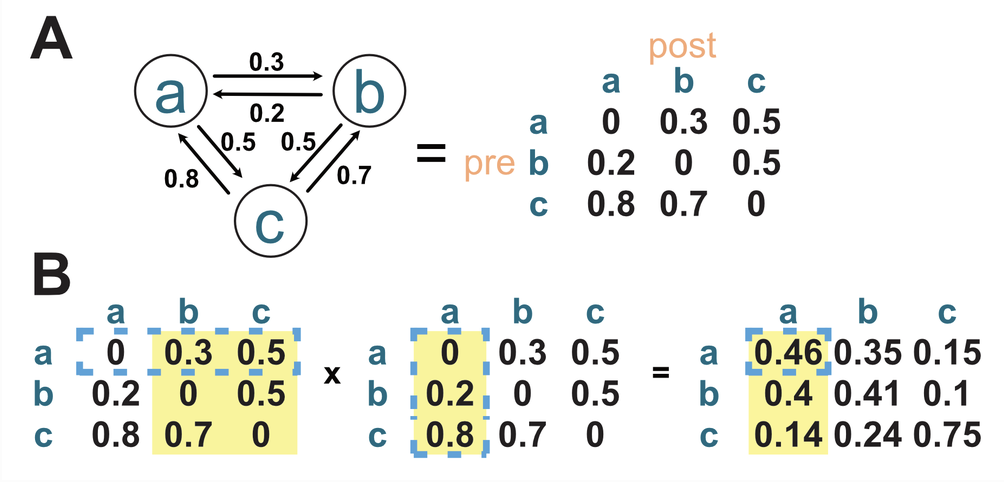
Effective connectivity Schematic. A) Is a toy circuit with neurons a, b, c (left) and its representaiton in matrix form (right). B) is showing the matrix multiplication from neuron a to a. Adapted from Yijie Yin, 2024.
Doing these calculations one neuron at a time would quickly become impractical. Instead, we can represent all the direct connections in a matrix.
For the toy circuit in the figure above (A, left), the connectivity matrix is shown (B, right)
The rows represent the source, or presynaptic, neurons:
and the columns represent the target, or postsynaptic, neurons:
Therefore, an entry means
For example,
in the matrix means:
The first row of the matrix is
This tells us all the direct connections leaving neuron (a):
Notice that this matrix contains only direct, one-hop connections.
So:
From one hop to two hops
What if we want to know how strongly (a) can influence another neuron after going through one intermediate neuron?
That requires two connections (two arrows on the toy circuit), or two hops:
Let’s say I want to know how strongly (a) can reach (a) in exactly two hops?
There are three possible intermediate neurons:
We calculate the strength of each path separately.
Through (a):
so
You might be wondering: how can connectivity exist? Remember, theoretically, our toy circuit could have self-connectivity. See the grey dashed lines:
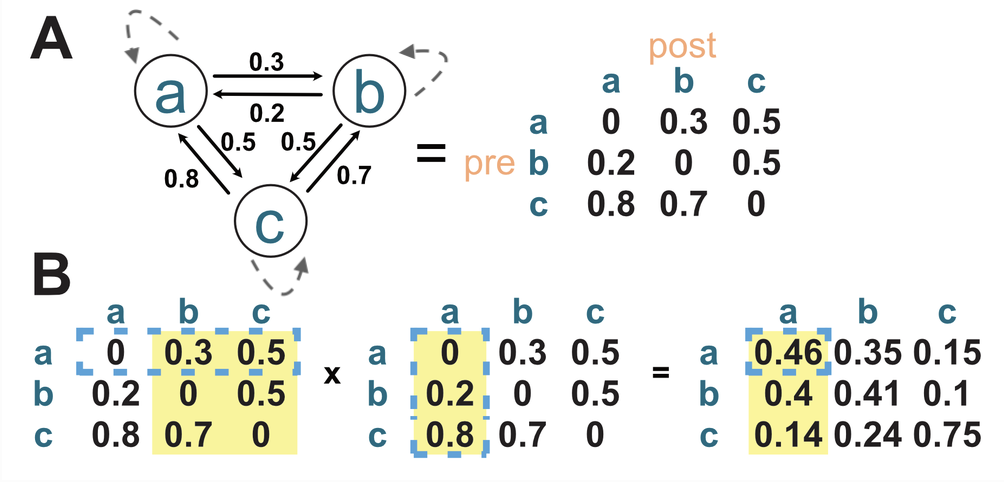
Effective connectivity Schematic. A) Is a toy circuit with neurons a, b, c (left) and its representaiton in matrix form (right). B) is showing the matrix multiplication from neuron a to a. Adapted from Yijie Yin, 2024. The dashed grey lines in A denote hypothetical self-connectivity.
You may notice that it is possible to have self-connections. Out circuit just doesn’t have any!
Through (b):
so
Through (c):
so
Sincer there are more than one possible path from (a) back to (a). We therefore add the contributions from all possible paths:
This gives us our second rule:
Where does matrix multiplication come in?
Matrix multiplication performs exactly the calculation we just did.
To calculate effective connectivity of (a,a), we take row (a) from the first matrix:
and column (a) from the second matrix:
We multiply corresponding entries and add them:
Each multiplication corresponds to one possible path:
This is why matrix multiplication is so useful for connectivity analysis. It automatically finds the contribution of every possible intermediate neuron.
For a real connectome, there may be thousands or millions of possible paths. Rather than calculating them individually, matrix multiplication performs all of these calculations simultaneously.
Why do the columns sum to 1?
There is one final property of this particular connectivity matrix that is important.
Remember that a column represents a target neuron.
For example, column (a) contains
This means that neuron (a) receives:
Together,
Or, in percentages,
The same is true for every column:
This also gives a useful way to remember the orientation of the matrix:
Download the male CNS connectivity data
Choose a directory where you would like to store the data. Run the command below on terminal. Replace YOUR DIRECTORY below with that path:
wget -P 'YOUR DIRECTORY' https://github.com/YijieYin/connectome_data_prep/raw/refs/heads/main/data/maleCNS/mcns_inprop_all_neuron.npzFor example:
wget -P project_dir https://github.com/YijieYin/connectome_data_prep/raw/refs/heads/main/data/maleCNS/mcns_inprop_all_neuron.npzThe downloaded file is called mcns_inprop_all_neuron.npz.
What is this file?
This file contains the connectivity matrix for the male CNS. In particular:
*_inprop— input-normalised connectivity. Each entry represents the fraction of a postsynaptic neuron’s input that comes from a given presynaptic neuron.
This is the connectivity matrix we will use to calculate effective connectivity in this tutorial.
Note: in this tutorial and competition we are focusing on the maleCNS connectome. If you are interested, you are welcome to explore the other connectomes that The Connectome Interpreter supports!
mcns_inprop = sp.sparse.load_npz(project_dir + '/mcns_inprop_all_neuron.npz')
mcns_inprop
<Compressed Sparse Column sparse matrix of dtype 'float32'
with 25083972 stored elements and shape (161429, 161429)>Wait ... Why can’t I see my dataframe?
You may be confused by this output: Compressed Sparse Column sparse matrix of dtype ‘float32’ with 25083972 stored elements and shape (161429, 161429)
Please refer to this section of the documentation for a more detailed explanation.
Essentially, our connectome is mostly sparse (most neurons don’t connect to each other). Instead of storing one gigantic memory-intensive connectome matrix (~10GB), we can store this information into something called an edge list (basically only the connections that actually exist are recorded with a pre-synaptic neuron, post-synaptic neuron, and the input proportion columns).
| pre | post | inprop |
|---|---|---|
| 101 | 205 | 0.32 |
| 101 | 873 | 0.15 |
| 205 | 992 | 0.71 |
| 873 | 101 | 0.04 |
What does float32 mean?
A bit is the smallest unit of computer information. It can be either:
01
So 1 bit = one 0 or 1.
A byte is 8 bits:
10110101 = 8 bits = 1 byte.
A float is a way of storing a number that can have a decimal, such as:
0.5
3.14
0.001
25.75
The number after float tells you how many bits the computer uses to store that number.
For example:
float16→ 16 bits → 2 bytesfloat32→ 32 bits → 4 bytesfloat64→ 64 bits → 8 bytes
More bits generally means the computer can represent numbers more precisely, but it also uses more memory.
So:
float32“Store each decimal number using 32 little 0s and 1s (32 bits), which takes 4 bytes of memory.”
For this connectome, if you have millions of connection weights, using float32 instead of float64 can cut the memory needed for those weights roughly in half.
Loading metadata
Since the data in our connectivity matrix is only connections between neurons. What if we have a biological question to ask? Like cell types etc. For each neuron (idx) in your matrix you have you have information describing the neurons themselves. This is mcns_meta.
If you run mcns_meta.[column_of_interest] you can pick a column of interest
# Import metadata
mcns_meta = pd.read_csv(
    'https://raw.githubusercontent.com/YijieYin/connectome_data_prep/refs/heads/main/data/maleCNS/mcns_all_neuron_meta.csv',
    index_col=0,
)
mcns_meta
/var/folders/2f/zb94ck9x7sv6fn_sq___fw280000gn/T/ipykernel_2817/4089168952.py:2: DtypeWarning: Columns (0: somaLocation) have mixed types. Specify dtype option on import or set low_memory=False.
mcns_meta = pd.read_csv(
mcns_meta.cell_type #cell type0 DNp01
1 OCG01d
2 VCH
3 AOTU019
4 VS
...
210460 SNxx33
210671 SNpp45
210739 SNta34
210918 SNta31
211096 SNpp45
Name: cell_type, Length: 161429, dtype: strmcns_meta.idx # index / neuron0 0
1 1
2 2
3 3
4 4
...
210460 161424
210671 161425
210739 161426
210918 161427
211096 161428
Name: idx, Length: 161429, dtype: int64mcns_meta.bodyid # unique neuron identifier in the malecns connectome. This is what you will find in neuPrint0 10001
1 10002
2 10003
3 10005
4 10006
...
210460 1349927540
210671 1387178136
210739 1399810824
210918 1434599043
211096 1471062202
Name: bodyid, Length: 161429, dtype: int64# Use type_to_function (which matched cell types with experimentally known function we loaded at the top of notebook) to map to each cell type.
mcns_meta['known_function'] = mcns_meta.cell_type.map(type_to_function).fillna('')
mcns_meta.known_function0 DNp01 escape_takeoff
1
2
3 AOTU019 frontal visual field object detection;...
4 VS Vertical flow
...
210460
210671
210739
210918
211096
Name: known_function, Length: 161429, dtype: strBuilding lookup dictionaries
Why do we use lookup dictionaries? Our connectome data uses an ID for each individual neuron. A lookup dictionary helps us connect that ID to useful biological information, such as its cell type, side, function, or location.
For example:
neuron idx → cell type
101       → L2
102       → L2
103       → Tm1
This information we need is already available in the metadata table mcns_meta as columns, however, since most analysis functions in connectome_interpreter use dictionaries we will create them. This dictionary set-up allows connectome_interpreter to take connections between individual neurons and group them into categories. For example, instead of looking at 101 → 103, we can summarize it as L2 → Tm1.
Think of a lookup dictionary as a quick translation table: neuron ID → biological information.
mcns_idx_to_type = dict(zip(mcns_meta.idx, mcns_meta.cell_type)) # idx assigned to a type
mcns_idx_to_sign = dict(zip(mcns_meta.idx, mcns_meta.sign)) # idx assigned to a neurotransmitter sign (1: excitatory -1: inhibitory)
mcns_idx_to_function = dict(zip(mcns_meta.idx, mcns_meta.known_function)) # idx assigned to a cell type function (if known)
mcns_type_to_sign = dict(zip(mcns_meta.cell_type, mcns_meta.sign)) # cell type assigned to a neurotransmitter sign (1: excitatory -1: inhibitory)
mcns_function_type_to_sign = dict(zip(mcns_meta.known_function, mcns_meta.sign)) # cell type and function assigned to a neurotransmitter sign (1: excitatory -1: inhibitory)
mcns_idx_to_bodyid = dict(zip(mcns_meta.idx, mcns_meta.bodyid)) # idx assigned to bodyid (bodyid is a unique number to identify maleCNS neurons in neuPrint)
Let’s pick cell types to calculate effective connectivity
Here, we will work through an example of effective connectivity from the visual system.
For another worked example, have a look at the Linear Methods tutorial notebook: 1.3 Effective connectivity: source → target from The Connectome Interpreter.
OL sensory neurons → VPN effective connectivity
Let’s begin with the visual system.
For some background on how the fly visual system is organized, see this section on the optic lobes (OL). You can also refer to Nern et al. (2025), which is the same dataset as the malecns connectome we are using here, but just focusing on the fully annotated right optic lobe connectome.
Before choosing our cell types, it is useful to think about what we are actually asking.
A source is the population of neurons whose output we want to trace. A target is the population of neurons that receives this information. Thus, when we calculate effective connectivity, we are asking questions such as:
Which target neurons receive “indirect” information from a particular source population, and how strongly are they connected?
For this example, let’s choose LC cell types as our target population. LC neurons are visual projection neurons (VPN) located near the end of the visual pathway, where visual information is transmitted from the optic lobes towards the brain. For our source neurons, let’s choose something based on superclass: describe broad sets of neurons, grouped together by anatomy or general function (Berg et al., 2025). I will go with sensory neurons in the optic lobe for this example as I am curious how do OL sensory neurons influence VPNs despite not having direct connectivity between them.
Choosing your own source and target populations
The examples above are just starting points. The mcns_meta dataframe contains several categories that can be used to define neuronal populations. For example, you might select neurons based on their cell_type, superclass, or another metadata category.
Take some time to explore the available categories and the values within them. For example:
mcns_meta.columnsYou can then inspect the unique values in a category:
mcns_meta["superclass"].unique()or:
mcns_meta["cell_type"].unique()Think about a biological question first, and then use the metadata to identify a reasonable source and target population.
A useful way to approach this is:
Biological question → source population → target population → connectivity analysis
For example:
How does early visual information influence LC cell types, even if they are not directly connected?
            ↓
       OL Sensory Neurons
            ↓
          LC neurons
            ↓
Calculate effective connectivity
# Source: all OL sensory neurons with a known function. Target: LCs with a known function.
mcns_sensory_ol = mcns_meta.idx[(mcns_meta.superclass == 'ol_sensory') & (mcns_meta.cell_type.isin(type_to_function))] # Filtering for idx which are a part of ol_sensory superclass and are also in the type_to_function dictionary
mcns_LC = mcns_meta.idx[mcns_meta.cell_type.str.contains('LC', na=False) & (mcns_meta.cell_type.isin(type_to_function))] # Filtering for idx which are a part of LC cell types and are also in the type_to_function dictionary
mcns_LC #idx where it is a LC cell type with a known function
539          534
1289        1274
1411        1396
1595        1578
1647        1629
           ...
168889    140189
169144    140309
190626    159095
190810    159193
193951    160247
Name: idx, Length: 3276, dtype: int64
# Find all 2-hop paths from OL sensory neurons to LC neurons.
# Returns a long-format edgelist with columns: pre, post, weight, layer (1 = direct connection).
# Weight here is input proportion
LC_sensory_ol_paths = find_paths_of_length(mcns_inprop, mcns_sensory_ol , mcns_LC, target_layer_number=2) #2 because we are interested in 2-hop connectivty
LC_sensory_ol_pathsWhat happens when you don’t understand how a function works?
A useful skill when working with computational tools is learning how to read the documentation. Documentation tells you what a function does, what information you need to give it, and what it will return.
You can find the full connectome-interpreter documentation here.
For example, we are using the find_paths_of_length() function. You can find the documentation for this specific function here.
If the documentation looks confusing at first, don’t worry. Documentation often uses technical terms that may be unfamiliar when you are just starting out. You can look up unfamiliar terms, ask a peer, or use AI to help you understand what the documentation is saying. The goal is not to memorize the documentation, but to learn how to extract the information you need from it.
Step 1: What does the function do?
Start by looking at the first sentence of the documentation:
“Finds the path of length
target_layer_numberbetweeninidxandoutidx...”
In simpler terms, this function looks for connections between a source and a target at a particular number of synaptic steps.
For our analysis:
inidx= the source neuronsoutidx= the target neuronstarget_layer_number= how many synaptic steps (or hops) we want to examine
For example:
Layer 1:  Source ─────────→ Target
              direct connection

Layer 2:  Source → Intermediate → Target
                    1 hop

Layer 3:  Source → Intermediate → Intermediate → Target
                    2 hops
The documentation tells us that layer 1 means a direct connection from the source. Increasing the layer number means adding more intermediates between the source and targets.
Step 2: What information does the function need?
Next, look at the Parameters section of the documentation. This tells us what we need to provide to the function.
For find_paths_of_length(), the important parameters for us are:
| Parameter | What it means |
|---|---|
edgelist | The connections in our network |
inidx | The source neurons |
outidx | The target neurons |
target_layer_number | The number of synaptic steps we want to examine |
You can think of these as the ingredients the function needs before it can do its job.
In our example, we provide:
find_paths_of_length(
    mcns_inprop,
    mcns_sensory_ol,
    mcns_LC,
    target_layer_number=2
)
Let’s match each ingredient to the documentation:
mcns_inprop       → edgelist
mcns_sensory_ol   → inidx (source neurons)
mcns_LC           → outidx (target neurons)
2                 → target_layer_number
Step 3: What does the function give back?
Finally, look at the Returns section.
The documentation tells us that the function returns a DataFrame containing the path data.
This means that after running the function, we can expect a table containing information such as:
the pre-synaptic neuron (
pre);the post-synaptic neuron (
post);the layer where that connection occurs; and
the weight of the connection.
So we can store the result in a variable and inspect it:
paths = find_paths_of_length(
    mcns_inprop,
    mcns_sensory_ol,
    mcns_LC,
    target_layer_number=2
)

paths.head()
When you encounter a new function, try asking yourself these three questions:
1. What does it do? → Look at the description.
2. What does it need from me? → Look at the parameters.
3. What will I get back? → Look at the returns section.
For the future functions we use, try to work through the documentation to understand what are the parameters and returns of the function along with the tutorial to gain a better understading of how to use the toolkit!
Since our connections are between neurons in OL sensory and LCs, we want to group them into cell type categories. But not just that, I want to go a step futher and group them by cell type and also function. Recall we made a dictionary exactly for this purpose early on? It’s mcns_idx_to_function. So let’s use that with a grouping function in he Connectome Interpreter group_path. Have a read of the documentation for yourself. What are the parameters. What will it return?
# Since the previous function called the 2-hop connections between Ol sensory neurons and LCs.
# It is time to add the cell type annotation to these in preparation to visualise these connections
#  Group paths by cell type and function
LC_sensory_ol_paths_func = group_paths(LC_sensory_ol_paths, pre_group=mcns_idx_to_function, post_group=mcns_idx_to_function)
LC_sensory_ol_paths_funcAfter grouping we can finally approach effective connectivity. Remmeber our LC_sensory_ol_paths_func dataframe are direct connections with everything from source as OL sensory neurons and LC cell types as targets. After all, that is why we are calculating effective connectivity. As these two groups of neurons are not necesarily synaptically connected. Rather, there are many intermediate players that connect in between which is why you are seeing different cell types than LCs in the post column and different cells than OL sensory neurons in the pre column. We will go into more details in the next tutorial about how this calculation is done, but for now this basic understanding is important.
Since this is not effective connectivity, but rather direct synaptic connection from everything in between OL sensory -> X -> LC, we need a function that calculates the effective connectivity from this dataframe. That is where effective_conn_from_paths comes in. Once again, look at the documentation for the ingredients (aka parameters) you need to feed the function
# Calculate and visualise effective connectivity from each OL sensory cell type and LC cell type.
eff = effective_conn_from_paths(LC_sensory_ol_paths_func)
display_df(eff.iloc[:20, :20]) # display 20 rows and columns
GPU not available, using CPU instead.
What am I looking at?
As you can see, effective connectivity from the photoreceptor level to the LC (VPN) level is generally weak. However, R7p, a UV-sensitive photoreceptor, shows noticeably stronger influence on LC6, a visual looming-related cell type.
This raises an interesting question: why might the R7p → LC6 pathway stand out from the other photoreceptor → LC connections? You could use this as starting point to explore the literature and investigate what is known about R7p, LC6, and their roles in visual processing. You may also find that examining the intermediate cell types in this pathway gives you additional clues and questions to proceed on futher.
Signed effective connectivity
Effective connectivity tells us whether two cell types can influence one another through indirect paths, rather than only through a direct synaptic connection. Here, we will also keep track of whether those paths are associated with excitatory or inhibitory influence.
Before calculating signed effective connectivity, we will group our paths by cell types and function again.
Although this tutorial always groups by cell type and function, this does not mean that we should always group by these variables. Depending on the question you are asking, it may be more appropriate to work at the individual-neuron level using body IDs. For example, if you are interested in a particular neuron’s signed effective connectivity and whether it differs in a cell type, keeping the body IDs would preserve that information.
The signed_effective_conn_from_paths() function can work with any grouping you choose. Before the function, you need to map idx -> grouping of choice (if any) as just explained. Then for signed_effective_conn_from_paths() we need to map that grouping you chose to the NT sign (eg., cell type -> NT sign, bodyid -> NT sign, and etc). In our mcns_meta dataframe, NT sign information is stored in the "sign" column, where +1 represents an excitatory sign and -1 represents an inhibitory sign according to the convention used in this dataset.
The function returns two dataframes representing the effective connectivity between sources and targets, one for effective excitation, the other inhibition. The neurotransmitter/sign annotation of the allows us to separate these paths into excitatory and inhibitory components. For more details see..
eff_exc contains the effective connectivity associated with excitatory paths, while eff_inh contains the effective connectivity associated with inhibitory paths.
# group by type and function
LC_sensory_ol_paths_type = group_paths(LC_sensory_ol_paths, pre_group=mcns_idx_to_function, post_group=mcns_idx_to_function)
LC_sensory_ol_paths_type# Find signed effective connectivity between source and target
eff_exc, eff_inh = signed_effective_conn_from_paths(LC_sensory_ol_paths_type, idx_to_nt=mcns_function_type_to_sign)
eff_exceff_inhThe two tables have the same source and target cell types, but the values represent different signed components of the effective connectivity.
For example, if an OL sensory neuron can reach a VPN through an excitatory intermediate neuron, that path contributes to the corresponding entry in eff_exc. If it reaches the same VPN through an inhibitory intermediate neuron, that path contributes to eff_inh.
Exploring the signed connectivity
You can now use the two matrices to ask questions such as:
Which OL sensory cell types have the strongest effective excitatory influence on each LC VPN cell type?
Which OL sensory cell types have the strongest effective inhibitory influence on each LC VPN cell type?
Do some OL sensory cell types have both excitatory and inhibitory routes to the same LC VPN cell type?
Are particular LC VPN cell types predominantly reached through excitatory or inhibitory paths?
Important caveat: neurotransmitter predictions and biological sign
The excitatory/inhibitory signs used here come from predicted neurotransmitter annotations, rather than being manually assigned from the literature for every cell type. The Connectome Interpreter uses the neurotransmitter predictions from Eckstein et al., 2024 also see here to estimate the sign of effective connectivity.
This creates an important caveat for certain cell types, such as some visual system cell types. Drosophila photoreceptors (OL sensory cell types) are known from experimental studies to release histamine, which acts as an inhibitory neurotransmitter in their downstream visual pathways. In this review Currier et al., 2023. See section: Optic Lobes, then sub-section: Photoreceptors feed into circuits that process motion, color, and polarization via histaminergic transmission. In the first paragraph, they note histamine acts as an inhibtiory neurotrasmitter to downstream connections. However, histamine was not one of the six neurotransmitters predicted by the model used in Eckstein et al. (2024).
Therefore, a photoreceptor receiving a +1 sign in this dataset does not automatically mean it is biologically excitatory.
This is a useful example of why connectomic analyses should be interpreted alongside the biological literature, particularly because, as you have learned, connectome datasets and their annotations have important limitations. When a computational annotation appears inconsistent with established biology, ask where the annotation came from, what assumptions were made, and what limitations the underlying prediction model has. Importantly, what you should takeaway is synapse-level connectomes don’t contain all the information and the whole field is working on this to add more “annotations” to the connnectome.
However, what connectomics does allow us to investigate is questions that have not yet been described in the literature. The resolution of synapse-level connectomes provides detailed maps of neuronal connectivity that were not available when many previous studies were published. Connectivity can therefore reveal new relationships and generate hypotheses about how information may flow through a circuit. However, connectivity alone generally cannot tell us the functional properties of a neuron, such as its neurotransmitter identity or whether its effect on a downstream neuron is excitatory or inhibitory. For these properties, it is important to examine the existing literature and determine what is already known. From this we can conclude perhaps, it’s not appropriate then to use the sign property for our example question.
See below from the mcns_meta dataframe the sign of the photoreceptors. You will notice they are +1 under column “sign”.
mcns_meta[mcns_meta.superclass == 'ol_sensory']How do we calculate the total signed effective connectivity onto a target neuron?
Here, I will use the biological example of OL sensory cell types → 2-hop effective connectivity → LC cell types. We will ask:
Are particular LC VPN cell types predominantly reached through excitatory or inhibitory paths?
To answer this, we can calculate the net effective connectivity by comparing the excitatory and inhibitory components. In other words, for each OL sensory cell type → LC cell type pair, we can ask whether the effective connectivity is more strongly associated with excitation or inhibition.
To see an example of this approach being used in a mushroom body circuit, along with the biological logic behind the analysis, see the Connectome Interpreter tutorial under Showcase: appetitive vs aversive MBON drive onto DNs.
Important: for the purposes of this example, I will still use the sign annotations in our dataset to demonstrate how the calculation works. However, as we discussed above, the sign annotation for photoreceptors has an important limitation because of their histaminergic neurotransmission. Therefore, we should not use the resulting excitatory/inhibitory values as a direct biological interpretation of photoreceptor influence.
# Net influence
net = eff_exc.fillna(0) - eff_inh.fillna(0)
net_lc = net.sum(axis=0).reset_index()
net_lc.columns = ['LC', 'net']
net_lc